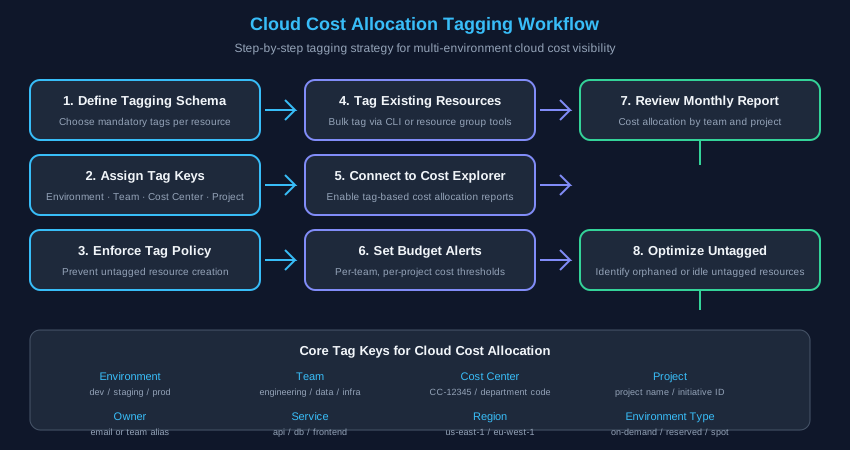
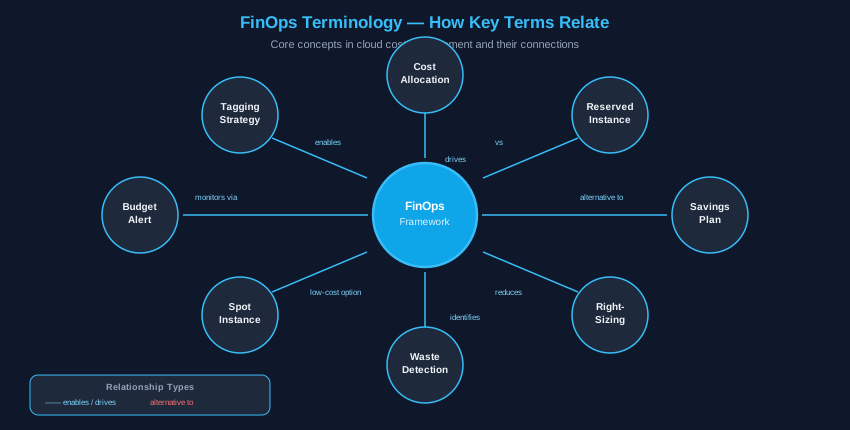
The FinOps Foundation defines three maturity stages. Each maps to specific tooling and process changes. The goal at every stage is accountability: knowing who spends what, and why.
Stage
Focus
Key Actions
Typical Time
Crawl
Visibility
Cost baseline, tagging schema, idle resource scan
0–30 days
Walk
Optimization
RI/Savings Plan purchase, right-sizing, budget alerts
If average CPU is below 40% over a 30-day baseline, the instance is oversized. Industry data shows 60–70% of cloud instances run at 2× required capacity.
Export CPU + memory metrics from CloudWatch / Azure Monitor / GCP Monitoring
Identify instances with < 40% avg CPU over 30 days
Test at target size before terminating original instance
Make one change at a time to attribute performance correctly
Set a monitoring alert on the new instance before closing the old one
03Reserved Instances vs. Savings Plans[ COMMITMENT REQUIRED ]
Feature
Savings Plans
Reserved Instances
Flexibility
High — any instance family, OS, AZ
Low — specific instance type + AZ
Discount
Up to 72% vs on-demand
Up to 75% vs on-demand
Commitment
1-yr or 3-yr USD amount
1-yr or 3-yr specific instance
Best for
Baseline predictable workload
Stable critical production
Recommendation: Start with a Compute Savings Plan for baseline workload. Layer specific RIs for your most stable, highest-utilization instances.
04Spot Instances for Fault-Tolerant Workloads[ BATCH / CI-CD ]
Provider
Max Discount
Use Case
AWS EC2 Spot
60–91% off
Batch processing, CI/CD agents
Azure Spot
Up to 90% off
Data pipelines, rendering
GCP Spot / Preemptible
Up to 91% off
Non-production workloads
Do NOT use spot for: databases, persistent APIs, any workload requiring consistent uptime.
05Storage Tiering[ LIFECYCLE POLICIES ]
Tier
Access
Cost
Retrieval Delay
Hot / Standard
Real-time
Baseline
None
Cool / Infrequent
Monthly
–40–60% storage
Hours
Archive / Cold
Quarterly
–70–80% storage
12–48 hours
Glacier / Deep Archive
Annual
–95% storage
Hours to days
Implement lifecycle policies to auto-transition: Hot → Cool (90d) → Cool → Glacier (1yr) → Glacier → Deep Archive (3yr)
06Tagging Strategy[ COST ALLOCATION ]
Required Tag
Example
Purpose
Environment
production
Isolate prod vs. dev spend
Owner / Team
platform-eng
Chargeback by team
CostCenter
CC-12345
Finance allocation
Project
payments-api
Per-project visibility
ServiceName
postgres-main
Resource identification
Enforcement: Use SCPs or policies to block resource creation if mandatory tags are missing. Audit weekly with: aws resourcegroupstaggingapi get-resources
Disclaimer: This guide provides general informational content about cloud infrastructure cost management. Figures and benchmarks are based on publicly available industry averages (e.g., Gartner, IDC, cloud provider documentation) and may vary by provider, region, and workload. This content is not a substitute for professional financial, legal, or technical advice specific to your organization.